My Shopping Cart

{{ item.title.replace('/[^A-Za-z0-9-, ]/', '') }}
{{option.group}}: {{option.name}}
{{option.option_name}}
{{item.custom.numberOfItems * item.quantity}} x ${{(item.price / item.custom.numberOfItems ).toFixed(2)}}
Qty
Tax
${{totaltax.toFixed(2)}}
Subtotal
${{total.toFixed(2)}}
QUOTE

Rules for Battlefield Design

#3 Rules to Keep in Mind while Designing a Laser Tag Battlefield

The long-awaited sequel to our Laser Tag Maze Design Trends article. Missed the previous post, check it out here!

In that blog, we discussed the kinds of fields operators use and the trends behind those designs. There are several considerations to keep in mind:

Indoor or Outdoor? This often affects the distance you should be using

Fixed or mobile? Do you have a permanent site or are you coming to the customer and constructing a “pop up maze”.

Adding fair / uniqueness: interesting backdrops add to the feel of the activity. Finding a location with its own unique setting that you can theme your site around can really help your business. Alternatively, choose a compelling theme and design around that. 

Now you’ve got a vision for your battlefield, let’s get into the crucial rules that make a Battlefield a success!

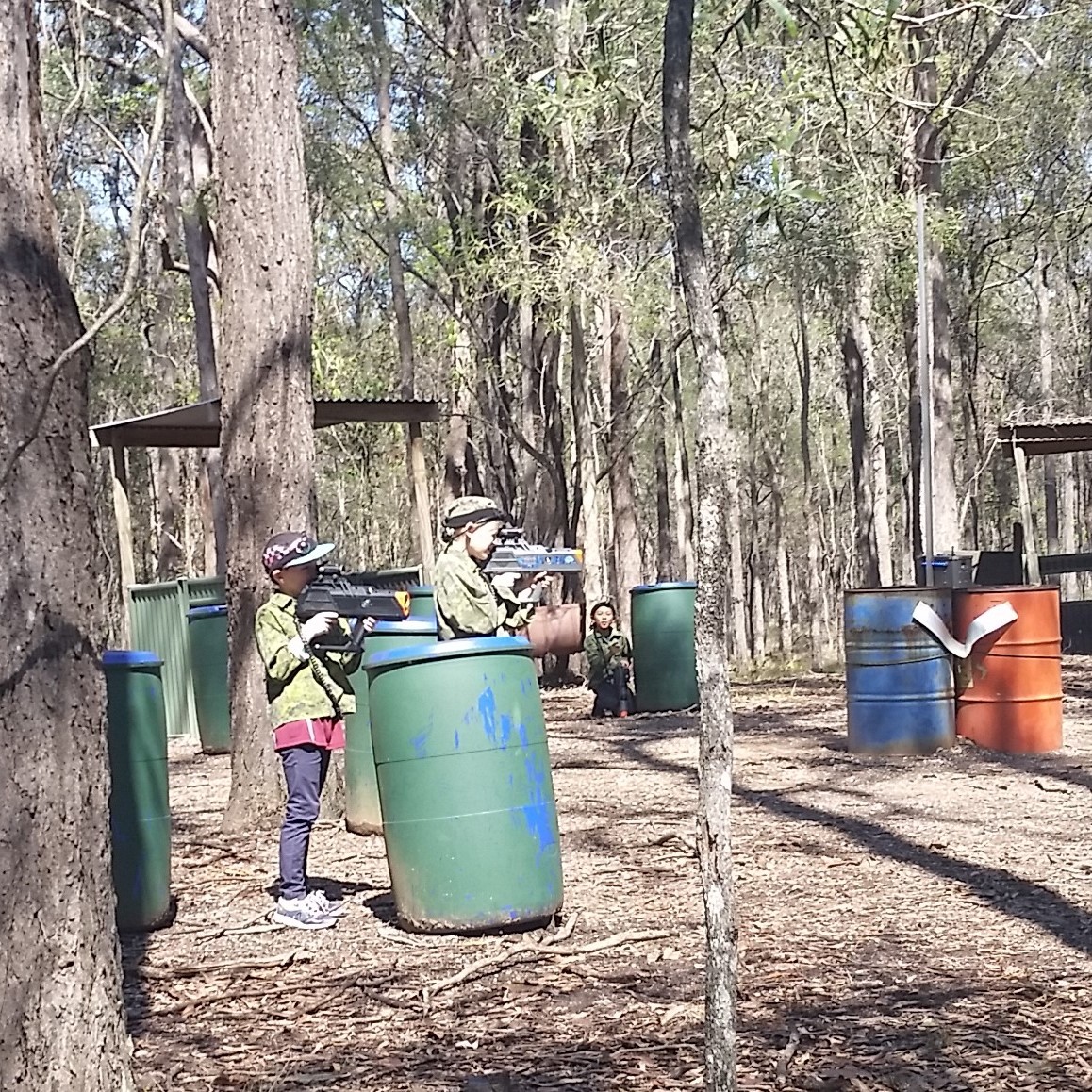
At our local Mt Cotton location, we recently added a bunch of new hiding spots around our forts area. These have proven popular among our players. 

#1 The Golden Rule: More the Merrier

Your goal for field construction is to include a lot of places for players to hide.

When it comes to mobile events, you want at least 1.5x your player numbers. This is typically done with inflatables. You can save time, and offer a discount, if your customers already have sufficient places to hide.

For example, school typically want all activities on their sports field or on a tennis court. These require inflatables. If you have 20 kids at once, you’re looking at 30 inflatables! If you can chat with the organizers ahead of time, you might find they have some trees or buildings that can used instead. That lets you cut down on the number of inflatables and improves the experience overall.


Avoid Blind Spots

While it’s not always possible to eliminate all blind spots in their design, reducing the number of hard corners (especially in made thoroughfares) increases the safety of your site.

Low walls (pictured to the right) typically allow players to see opponents and teammates coming. The same is true for small inflatable shapes (pictured below).


Vary the Obstacles

Where you can, vary the size, shape, and height of the hiding spots. This is especially possible on fixed fields. Trees provide tall and narrow places to hide. Low walls let players duck down and hide.

At our Mt Cotton location we have:

* Forts (spread out in a circle with the entrances facing inwards)

* Trees (thick, thin, and massive ones!)

* Barrels (approx. 1 metre high)

* Low Walls (approx. 1 metre high)

On a fixed location, the more hiding spots you can include, the better.

For an indoor site, your goal should be x2 your max player count.

This gives people the opportunity to try out new angles and places to hide, without getting too close to other players.


#2 Distance

One mistake operators often make as they design a new battlefield is not considering appropriate distances between each hiding spot. The temptation is to fill an open space, spreading out your obstacles evenly.

That’s where a great battlefield becomes a boring battlefield.

Ignore the size of our space, instead consider how many steps it will take to move from one hiding spot to the next. 

If your primary audience is adults, their strides will be longer and you can spread your obstacles out further. But if your target audience is 8 – 12, consider how far the average 10-year-old can step. Hint: it’s a lot shorter!

You want it to take between 2 – 3 steps to move to the next location. Any higher, and the risks for moving outweigh the rewards.

If a player must run 10 steps to get to the next fort, tree, or wall then they will likely die before they reach it!

That’s disastrous. 

What you get is a lot of players sticking to the same hiding spots, never advancing. Or if they do advance, becoming increasingly frustrated. The game stops being a challenge – and becomes entirely based on luck.


#3 Multiple Angles & Directions

When designing a new battlefield (this is especially true for mobile events!), you will also want to consider the different games you might play on the field.

For example, a Hot Spot game requires 2 bases (1 for each team) + 3 – 4 Hot Spots. Each of the Hot Spots should be somewhat shielded, meaning players who wish to score a point must move up to the center of the field.

There should be at least a few viable hiding spots around each of the Hot Spots, allowing for players to be unpredictable and work as a team.


Meanwhile when running a Team Death Match mission, typically you will want to set up 2 – 3 Supply Crates.

In the case of 3 Supply Crates, one crate should be close to one team, while another should be close to another team. The central box should be equal distance from each base.


Typically, the Supply Crates should be sheltered in some way so players can collect supplies – however it shouldn’t be easily defended! A supply crate that has too much cover can be too advantageous and encourage players to spend the entire game camping the box. Players should still die while collecting supplies!

Furthermore, if you have the same group for multiple rounds, it’s always a good idea to mix-up where their base it. After the first game, you can switch sides, but for the third game, the bases should be moved. 

This means that the forts and walls should be positioned so that they are useful regardless of the direction the main battle is taking place. See above for how this can be done on an outdoor field.


Now You Know the #3 Rules for Laser Tag Battlefield Design

Creating a successful playing area isn't easy.

How "fun" a location is can depend on simple changes. Now you have the #3 Rules for creating an amazing maze for laser tag games!

©2026 All rights reserved

FatGalah

Close
GDPR Information
Necessary
Functional
Tracking

GDPR (General Data Protection Regulation): A European law that helps protect people’s personal data and privacy. It sets guidelines for how organizations handle personal information and gives individuals rights to access, correct, or delete their data.

Necessary

Session Cookie

A session cookie is a temporary cookie used to maintain user activity during a browsing session and is deleted when the browser is closed.

GDPR Cookie

Session cookie (GDPR): A temporary cookie used only to enable essential website functionality during a user’s session and deleted when the browser is closed.

Functional

Used to provide live chat and customer support functionality, allowing visitors to communicate with our team in real time.

Used to manage and deploy website tags from one place. Google Tag Manager itself does not collect personal data, but it may load other tools that do.

Tracking

Used to collect anonymous information about how visitors use our website, such as pages visited and time spent on the site. This helps us improve website performance and user experience.

Marketing - Section